Images are everywhere in 2026, and they are super important for catching people’s eyes online. But making all those pictures can be tough. It takes a lot of time and effort. This is where a photo AI generator comes in handy.
What exactly is a photo AI generator? It’s a smart computer program that uses artificial intelligence to create pictures from words you type or from other images you give it. Think of it like magic, turning your ideas into unique visuals almost instantly. These tools are built on advanced systems like Diffusion Models, which have become very good at making high-quality images today Image Generation Models: A Technical History.
For digital media teams and creators, a photo AI generator is a game-changer. It helps them make cool, new images much faster than before. Instead of hiring artists for every single picture or spending hours searching for stock photos, they can simply ask the AI to create what they need.
This means they can produce many more pictures, keep quality high, and even explore new creative ideas they might not have had time for before. These tools are part of a bigger trend, with other AI programs helping with things like best free AI image to video generator and even video editor ai.
Teams often face big problems like needing content quickly, needing tons of images for different platforms, making sure everything looks good, and avoiding legal worries about using copyrighted pictures. This guide is here to help you understand how photo AI generator tools can fix these issues. We will show you the best tools available, how to use them easily, and how to get the most out of them for your work. You’ll learn how to pick the best AI image generators 2026 for your specific needs.
Want to keep up with all the fast changes in AI?
The AI Newsletter Worth Reading and get clear daily AI updates from The Deep View Newsletter.
How photo AI generators work: models, inputs, and outputs
So, how do these amazing photo AI generator tools actually create pictures from your ideas? It’s like they have different brains or "models" that follow special steps to make images. Let’s look at how these models work and what you need to give them.
The Smart Brains Behind the Pictures: AI Models
There are a few main types of smart computer brains that power a photo AI generator.
You can think of them as different kinds of artists, each with their own way of painting.
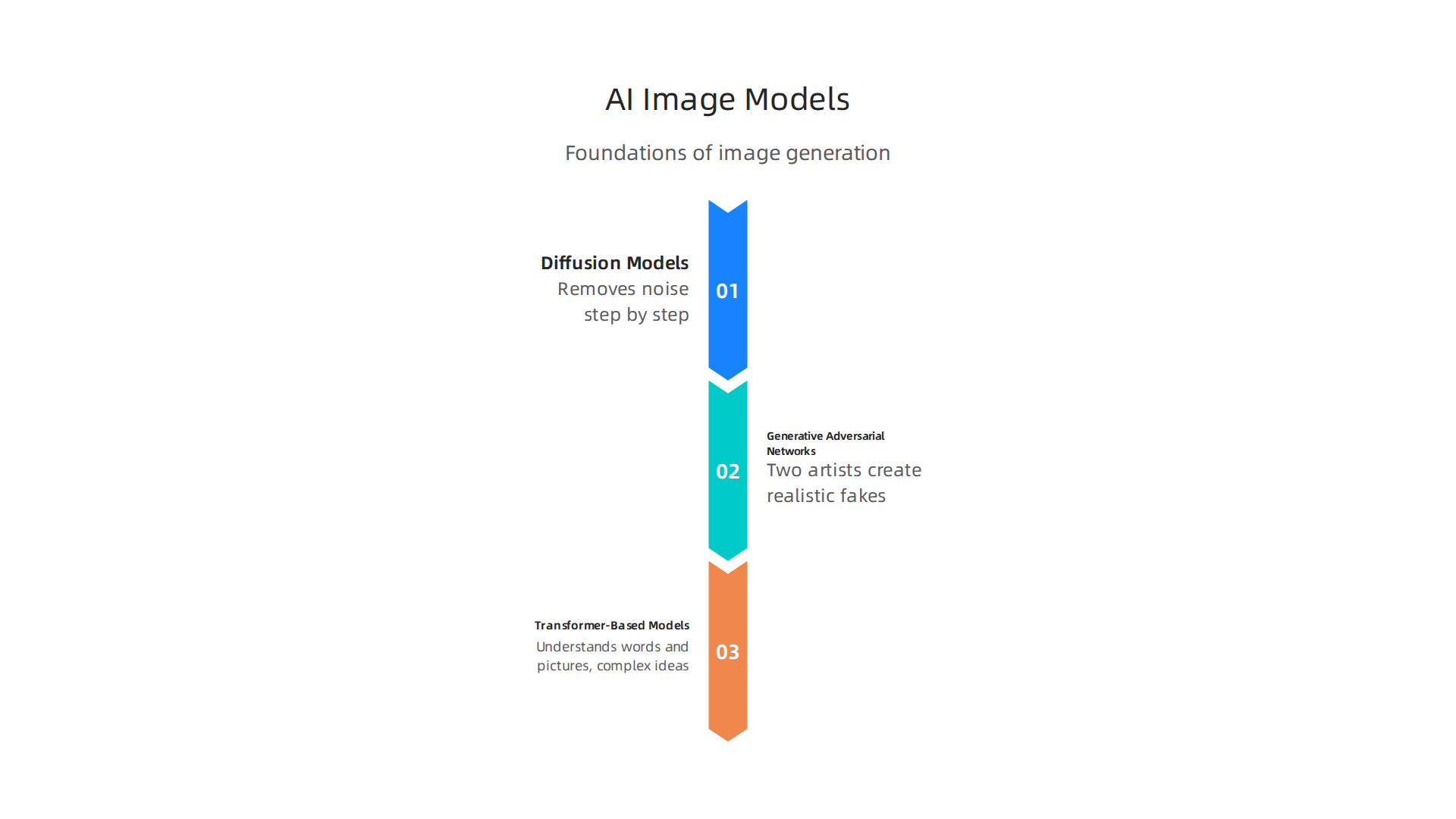
- Diffusion Models: These are very popular in 2026. Imagine starting with a blurry, noisy image. A Diffusion Model works by slowly removing that noise, step by step, until a clear picture appears. It learns how to turn noise into something meaningful by studying tons of real pictures. This method helps make really high-quality images Diffusion Model Paper Survey: Evolution of Image Generation from….
- Generative Adversarial Networks (GANs): GANs are like two artists working together. One artist tries to create a fake picture, and the other artist tries to tell if it’s fake or real. They keep practicing until the first artist can make pictures so good that the second artist can’t tell them apart from real ones. GANs have been around for a while and are still useful for certain tasks Generative Models: VAEs, GANs, Diffusion, Transformers,….
- Transformer-Based Models: These models are very powerful and can understand both words and pictures at the same time. They look for connections between different parts of the input and output. This helps them create images that perfectly match the descriptions you give. They are very good at understanding complex ideas. Many of these models learn by looking at countless images paired with descriptions, which helps them connect words to visual ideas.
All these models get very good at their job by looking at a huge amount of pictures and words, like a student studying a giant library of art. This "training data" teaches them what things look like, how colors work, and how objects are usually arranged.
What You Tell the AI: Inputs and How They Work
To make a photo AI generator create exactly what you want, you need to give it instructions. These instructions are called "inputs."
- Text Prompts: This is the most common way to talk to a photo AI generator. You simply type in what you want to see, like "a happy dog wearing sunglasses on a skateboard" or "a futuristic city at sunset." The more clear and detailed your words are, the better the AI can understand and create your vision.
- Image Seeds: Sometimes, you might have an existing picture that you want the AI to base its new creation on. You can give the AI an "image seed," which is like a starting point photo. The AI will then generate new images that are similar in style or content to your original seed. This helps you guide the AI more closely.
- Masks: Imagine you have a picture and you only want to change a small part of it. A "mask" lets you draw over the area you want the AI to focus on. For example, you could draw a mask over a car in a picture and tell the AI to change it into a truck. This gives you very fine control over the output.
By using these inputs, you can steer the photo AI generator to make images that are just right for your needs. Whether you’re creating images for social media or making an ai animation generator, understanding inputs helps you get better results. You can even use AI tools to improve existing photos with an ai photo enhancer fixes blurry photos in seconds in 2026.
After you understand how to talk to a photo AI generator with inputs, the next big step is picking the right tool for what you want to do.

Just like different brushes make different kinds of art, different AI generators are better for different jobs.
Choosing the right generator for your use case (marketing, product, publishing)
In 2026, there are many amazing photo AI generators, and finding the best one depends on your specific needs. What works for a marketing team might not be the best for someone creating product mockups or publishing a story.
Match the AI’s Strengths to Your Goals
Each photo AI generator has its own special talents.
Here’s how to think about them:
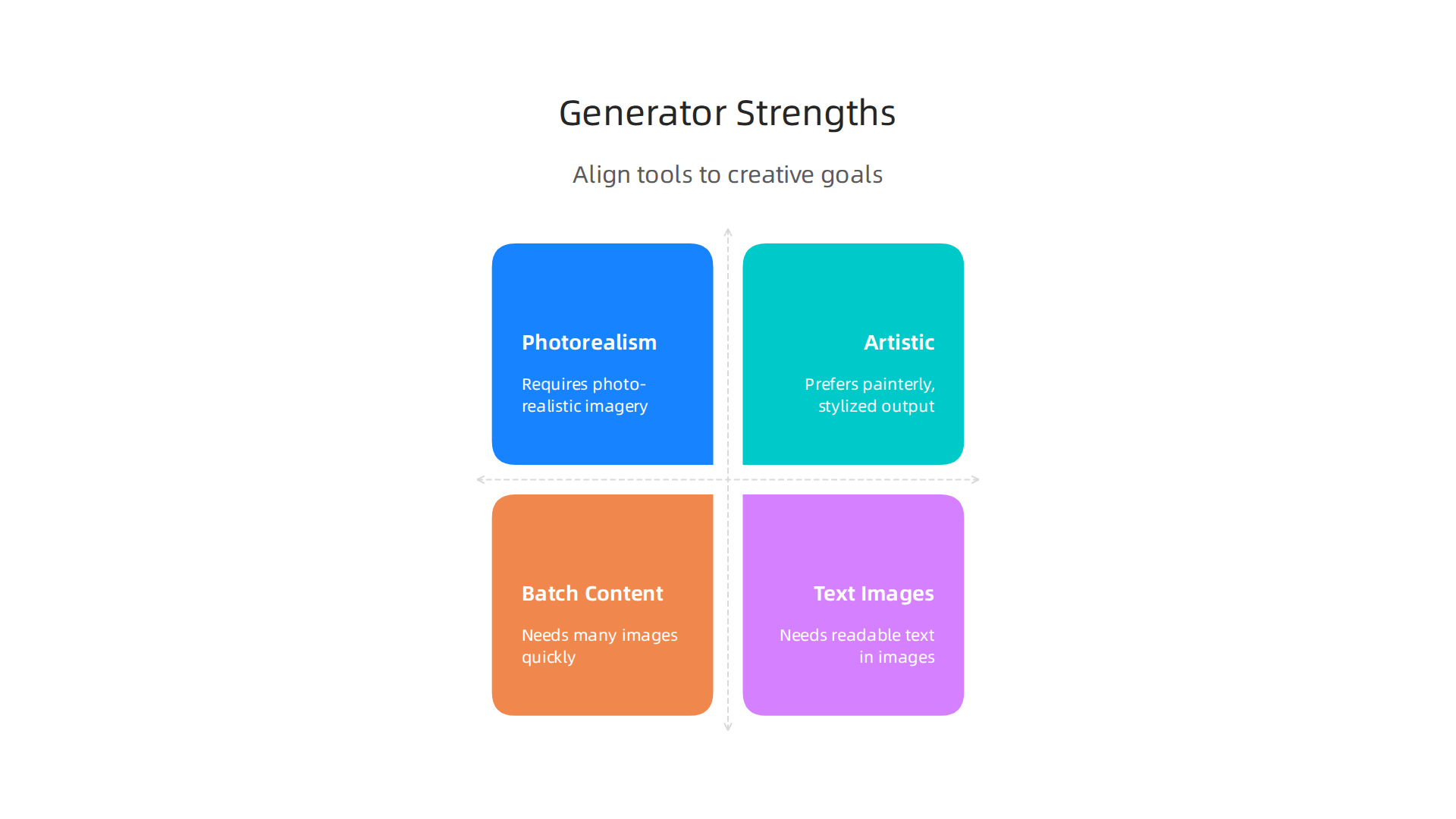
- For Pictures That Look Real (Photorealism): If you need images that look like real photos, maybe for an advertisement or a product catalog, you should look for tools known for photorealism. For example, in 2026, tools like Flux 1.1 Pro and GPT Image 1.5 are often praised for making very lifelike images The Best AI Image Generators in 2026: 12 Models Tested.
Some experts even suggest Flux 2 Pro or Imagen 4 Ultra for top photorealism Best AI Image Generation APIs in 2026. These are great for showing products clearly or creating realistic backgrounds.
- For Artistic and Creative Styles: If you want something more like a painting, a cartoon, or a unique artistic style for things like social media posts or concept art, Midjourney is a popular choice. It’s known for its ability to create images with a strong atmosphere and creative punch The Best AI Image Generators in 2026: 12 Models Tested. This is often perfect for brands trying to build a unique visual identity.
- For Making Lots of Images (Batch Content): Sometimes, you need many similar pictures quickly, like for different social media campaigns or for testing ideas. Tools that allow for deep customization and can produce images in high volume at low cost, such as Stable Diffusion 3.5, can be very useful here Best AI Image Generator 2026: GPT Image 2 vs 4 Rivals – Tech Insider. This is especially helpful if you’re feeding these images into
social media analytics toolsto see what works best. - For Images with Text (Editorial or Publishing): If your images need to include clear, readable text within them, like for a magazine cover or a promotional graphic, some AI generators do this better than others. Ideogram and GPT Image 2 are often highlighted for their accuracy in rendering text inside images The Best AI Image Generators in 2026: 12 Models Tested. This is key for publishing where messages need to be clear.
You might also be looking for tools to help with more than just static images, perhaps an ai animation generator or even figuring out how to make ai videos. While the focus here is photos, many platforms are expanding to offer these video capabilities too. For general use, some tools like ChatGPT Images offer a broad range of features with less hassle Best AI Image Generators in 2026: The Right Picks for Most ….
Important Things to Think About
Beyond the style of images, there are practical things to consider when picking a photo AI generator:
- Cost: Some tools are free, some have monthly subscriptions, and others charge per image. Your budget will play a big part in your choice.
- Speed: How fast does the generator create images? If you need quick turnaround times, speed is key.
- How it Connects (Integration Points): For businesses, it’s important if the AI generator can connect with other software you use. Many offer APIs (Application Programming Interfaces), which means developers can link the AI directly into your company’s own apps or websites. This is covered in more detail when discussing best ai image generators 2026 10 tools compared.
- Rules and Safety (Output Governance): Some companies have strict rules about the content they can use or create. Make sure the AI generator you choose can follow these rules and avoid creating inappropriate or off-brand images.
Choosing the right photo AI generator means thinking about what you want to achieve and how the tool fits into your workflow.
Want to keep up with all the latest AI tools and news, including the best generators for every use case?
Get clear daily AI updates from The AI Newsletter Worth Reading.
Once you’ve chosen the perfect photo AI generator, the next big step is making it work smoothly for your team, especially when you need to create many images or manage big projects. This is where a good workflow comes in handy, turning ideas into finished pictures.
Workflow integration: from ideation to production
For many businesses in 2026, using a photo AI generator is not just about making one image. It’s about how that tool fits into their daily work. Imagine you’re working with a team. Everyone needs to use the AI in a similar way to get good, consistent results. This is where organized workflows help a lot.
Practical Pipelines for Teams
Teams need clear steps to make sure their AI-generated images are top-notch and on brand.
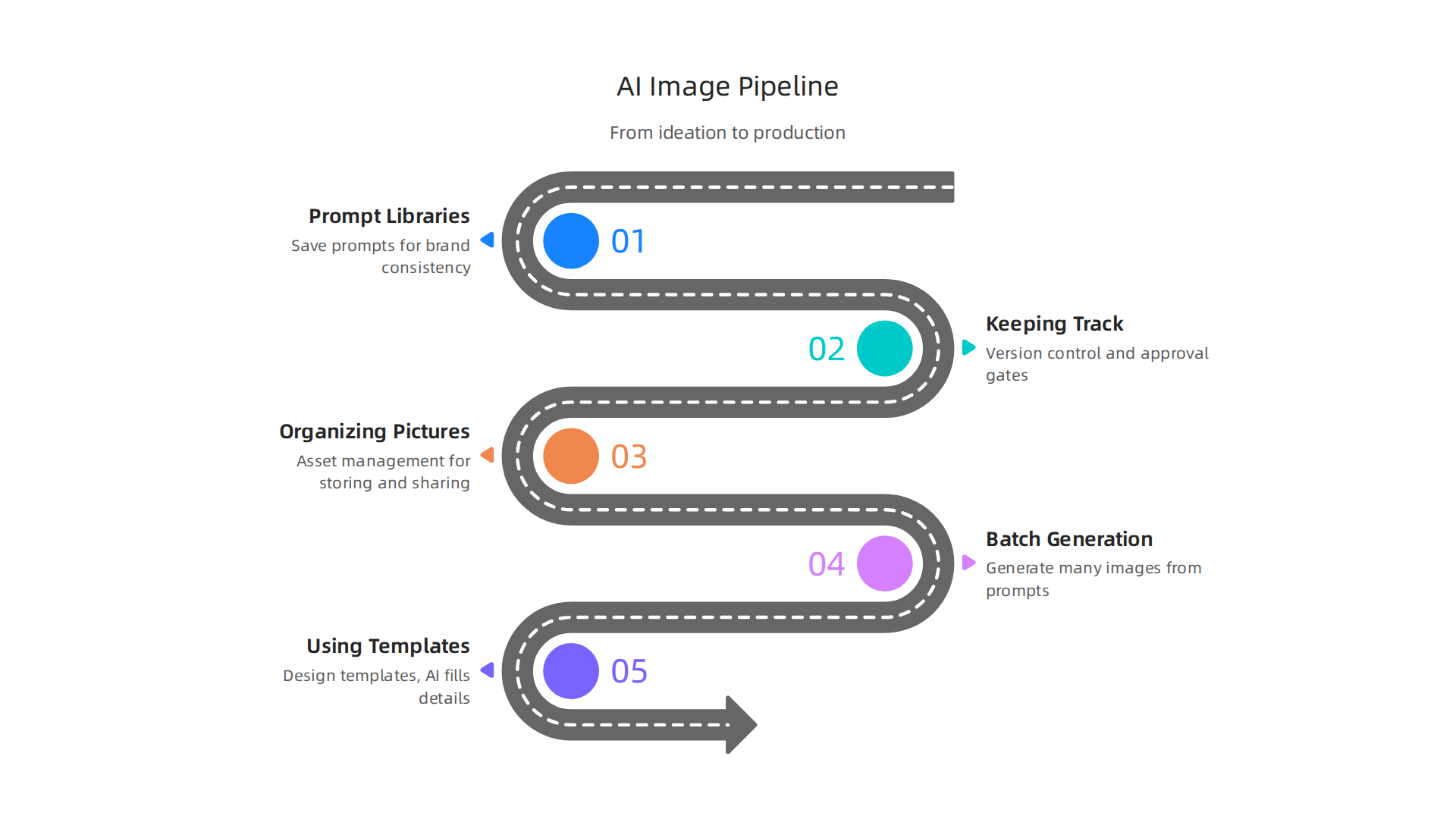
- Prompt Libraries: Think of these as special recipe books for your AI pictures. Instead of typing the same instructions over and over, you save your best "recipes" or prompts. This way, everyone on the team can use the same good starting points. It makes sure all pictures look like they belong to the same brand. Many of the top AI image generators in 2026 offer features to help teams manage their creative processes and workflows smoothly The 8 best AI image generators in 2026.
- Keeping Track (Version Control and Approval Gates): When a team makes images, things can change. You might want to try different looks or fix a small detail. "Version control" is like keeping a history book of all the changes. You can always go back to an older version if you need to. And before an image goes public, it often needs a "yes" from a manager. These "approval gates" make sure everything looks right and follows company rules. This helps reduce the confusion and information overload that many busy professionals face.
- Organizing Your Pictures (Asset Management): After you make lots of great images with your photo AI generator, you need a good place to keep them. "Asset management" systems are like big digital filing cabinets. They help you store, find, and share your AI-generated images easily. This is super important when you’re making content for different campaigns or analyzing what works with social media analytics tools.
Automation and Scale: For Big Projects
When you need many images for marketing campaigns or online stories, doing each one by hand takes too much time. This is where automation and scaling come in.
- Making Many Images at Once (Batch Generation): Some photo AI generators can create hundreds of images from similar prompts all at once. This "batch generation" is great for testing different ad ideas or filling up social media feeds quickly. This can really speed up processes for AI for Marketing Consultants.
- Using Templates: You can also use templates. This means you set up a basic design or look, and the AI fills in the details. It’s like having a cookie cutter for your images, making sure they all have a consistent style.
- Smart Connections (API Orchestration): For bigger companies, AI tools often connect to other computer programs through something called an API. Think of an API as a special phone line that lets different apps talk to each other. This "API orchestration" means a company’s systems can automatically ask a photo AI generator to make images as needed. This helps businesses work faster and scale their creative efforts easily. Many top AI image generators in 2026 offer powerful APIs for these purposes Best AI Image Generation API (2026). This kind of smart connection can even extend beyond just photos. Businesses are now looking into ai animation generator tools and learning how to make AI videos to add moving pictures to their campaigns. Tools that can make images into videos are becoming very popular.
After creating images with a photo AI generator, the next important step is to check if they are good enough. This means looking at how well they match what you asked for, how clear and beautiful they look, and making sure they do not show any unfair biases.
Evaluating Image Quality, Fidelity, and Bias
Making sure your AI-generated images hit the mark is key, especially if you are using them for important things like marketing or news. You need to know if the pictures truly reflect your vision and values.
How to Check Image Quality
There are a few ways to check if the images created by a photo AI generator are good.
- Using Numbers and Tools (Automated Metrics): Experts use special tools that give scores to AI images. These scores help measure things like how real the images look or how different they are from each original idea. Some well-known scores include the Inception Score (IS) and Fréchet Inception Distance (FID). These tools can compare many images quickly. For a deeper dive, you can explore guides on Your Image Generation Evaluation Guide: Key Metrics and Strategies.
- Asking People (Human Reviews): Sometimes, the best way to know if an image is good is to ask people. You can show different versions of an image to a group and ask them which one they like better. This is called A/B testing, and it helps you understand what real people prefer. Seeing images side-by-side helps a lot in deciding which ones are best, as discussed in Evaluating Image generation models.
Understanding Image Fidelity
Fidelity means how closely the AI-generated image matches your original idea or text prompt. Did the AI really understand what you asked for? You can check this by comparing the image to your written request. If you asked for a "blue cat wearing a hat," did the photo AI generator give you exactly that? Making sure the images are faithful to your input is a big part of getting the results you want. This is also important when choosing the best AI image generators 2026 for your specific needs.
Watching Out for Bias
Here is a serious point: AI models learn from huge amounts of existing pictures and data. If that data had unfair ideas or showed only one type of person or thing, the AI might learn these biases too. For example, if an AI is mostly trained on pictures of one gender in a certain job, it might always show that gender for that job, even if it is not true in real life. This is called bias.
It is super important to check AI-generated images for bias. You want to make sure your pictures are fair and show many different kinds of people and situations. If you are not careful, biased images can send the wrong message or even upset people. Checking for these kinds of differences across groups is part of evaluating how well AI models work. Learn more about how to check AI models, including for "performance disparities across groups," by checking out research on EvalGIM: A Library for Evaluating Generative Image Models. Understanding these potential problems is part of knowing The Real Dangers of AI in 2026.
Staying informed about AI developments, including ethics and evaluation, is crucial for anyone using these powerful tools.
The AI Newsletter Worth Reading
While making sure your AI images are good and fair is important, there is another big part to think about: the rules. When you use a photo AI generator, questions about who owns the pictures, where the AI got its learning data, and what you can do with the images become very important in 2026.

Legal, copyright, and policy considerations for generated photos
Who Owns AI Art?
This is a tricky question right now. If a person creates art, they usually own the copyright. But what happens when an AI makes a picture from your simple text idea? Some argue the person who wrote the prompt owns it. Others say the company that made the photo AI generator owns it. In some places, like the U.S., copyright law often says only humans can own copyrights. This means many AI-generated images might not be protected by copyright at all. This area is still changing quickly, so it is a good idea to stay updated.
The Training Data Problem
Every photo AI generator learns from a huge collection of images. These images might come from the internet, books, or art databases. But here is the problem: were all those original images properly licensed for the AI to learn from? If an AI was trained on copyrighted pictures without permission, it raises questions about whether the new images it creates are truly "original" or if they carry a piece of the original copyright problem. This is a big debate for creators and companies. Knowing about tools that help with how to master data scouting in 2026 can highlight the complexities of data sourcing.
Understanding Platform Policies
Each company that offers a photo AI generator has its own set of rules. These are usually found in their "Terms of Service" or "Acceptable Use Policy." These rules tell you:
- What kind of images you are allowed to create (e.g., no harmful or illegal content).
- How you can use the images (e.g., for personal use, commercial use, or if you need to give credit).
- What happens to the images you make (e.g., does the company get to use them too?).
It is super important to read these policies for every photo AI generator you use. Ignoring them could lead to legal trouble or getting your account shut down. For example, if you are creating images for marketing, you need to be sure your digital marketing platform for small businesses can handle the legal requirements for AI-generated assets.
Making Your Own Company Rules
If your business plans to use AI-generated images, having your own clear rules is a must. This helps everyone on your team know what to do and keeps your company safe.
- Acceptable Use: Decide what kind of content is okay and not okay for your company to create with a photo AI generator.
- Model Provenance: Try to understand where the AI models you use were trained. This can be hard, but it helps you know if there might be hidden problems with copyrighted data.
- Attribution Requirements: Decide if you need to state that an image was made by AI. This can be important for transparency, especially in areas like news or educational content. Tools like Originality AI is the most accurate AI content detection tool in 2026 can help identify AI-generated content.
Staying on top of these legal and policy matters is just as important as making good, fair images. It protects you and your work.
When you have your own company rules for using AI, the next big step is to pick the right tools. This means carefully looking at different companies that offer a photo AI generator or other AI tools. Choosing a vendor is more than just picking the one that makes the prettiest pictures. It is about making sure they fit your company’s needs and keep you safe from problems.
Vendor evaluation: feature checklist and procurement questions
Choosing an AI vendor, whether for a photo AI generator, a video editor AI, or an AI animation generator, needs clear steps. You need to ask the right questions to make a good choice.
Key Questions for Vendors
Here are some important things to ask any company selling you an AI tool:
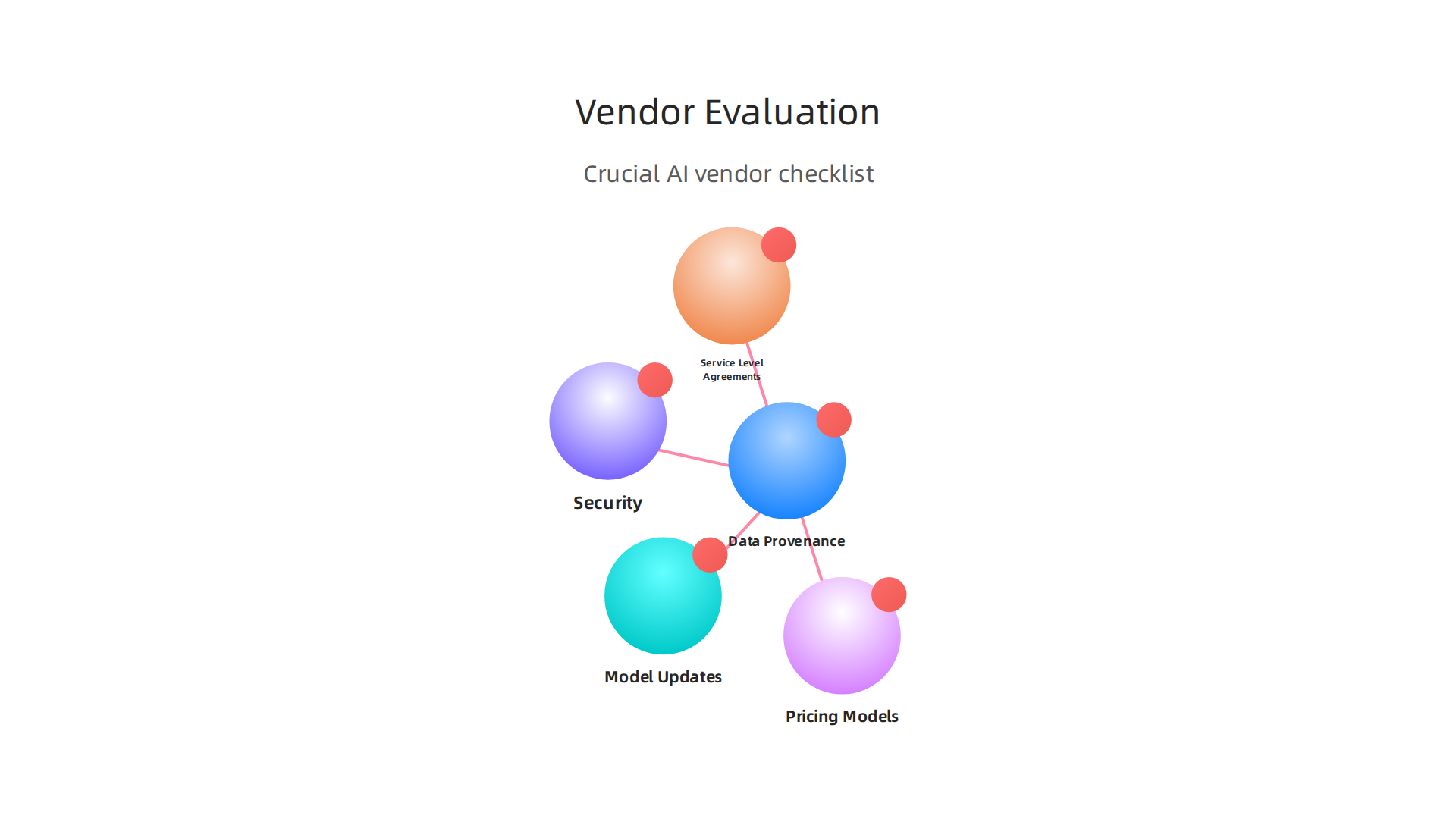
- Data Provenance: Ask where their AI models learned from. This is about the "training data problem" we talked about earlier. Knowing this helps you avoid future legal issues. For 2026, a key question is "Where does our data go?" and "Is it used for training?" to ensure your information stays private and isn’t used to further train their models without your permission AI Vendor Evaluation Checklist for 2026 Procurement.
- Model Updates: How often do they make their AI better? Does the photo AI generator get new features or fixes often? This helps you know if the tool will stay up-to-date in the fast-moving world of AI.
- Service Level Agreements (SLAs): What promises does the vendor make about their service working? This includes how much uptime you can expect and how fast they fix problems. Look for uptime promises that match your needs Vendor Evaluation Criteria Checklist for Procurement Teams.
- Pricing Models: How do they charge? Is it a monthly fee, or do you pay for each image you create, or for how many images you use? Make sure the pricing fits your budget and how much you plan to use the tool.
- Security: How safe will your company’s information and the images you create be with them? Make sure they have strong security steps in place. This includes understanding what types of data they process and where it is stored Enterprise Vendor Due Diligence Checklist for Software ….
Running Pilot Programs and Scoring Vendors
To really see if a vendor is a good fit, you should run a small test or "pilot program." This lets you try out their photo AI generator in real life. During this pilot, you can check:
- Technical Fit: Does the AI tool work well with your current computer systems? Is it easy for your team to use? Can it integrate with tools like your social media analytics tools if you’re making content?
- Operational Fit: Does it help your team work better and faster? Can it handle the amount of work you need it to do? This might include seeing if it helps with things like how to make AI videos more efficiently.
- Legal Fit: Does the vendor’s tool and their rules match your company’s legal requirements and policies? This goes back to the copyright and data privacy concerns.
After your pilot, you can score each vendor. A good way to do this is using a "weighted scorecard" method. This means you give points to different important things, like security or how easy it is to use, and then pick the vendor with the highest score Vendor Management Strategy: Procurement Guide 2026. This makes your decision fair and clear.
Choosing the right AI partner is a big decision that affects your work every day. Taking the time to evaluate them properly means you’ll pick a tool that helps you, not hurts you. If you’re looking for more comprehensive coverage on these topics, consider exploring how to How to Choose the Best Enterprise AI Platform for Your Organization.
For daily updates on new AI models, company news, and policy changes, you need a reliable source.
Get clear daily AI updates from The AI Newsletter Worth Reading.
After picking the best AI tools and vendors, the next important step is to see if they are actually helping your company.

This means measuring how much value you get from your investment, also known as Return on Investment (ROI). It is not enough to just use a new photo AI generator or video editor AI. You need to know if it makes your work better, faster, or saves you money.
Defining Success Metrics for AI Tools
To measure ROI, you need to set clear goals for what "success" looks like. Here are some key things to look at:
- Speed-to-Market: How much faster can your team create new content, like images from a photo AI generator or short clips from an AI animation generator? If you can get new campaigns out quicker, that’s a big win.
- Cost Per Asset: What is the actual cost to produce one image or one video using AI compared to doing it the old way? This includes time saved and money not spent on outside help. Tracking cost reduction targets is a direct way to see savings.
- Engagement Uplift: Are the images or videos made with AI more interesting to your customers? You can check if more people click, share, or spend more time looking at content created with AI. Tools like social media analytics tools can help you track these changes.
- Downstream Conversion Signals: Do these better, faster, or cheaper assets actually lead to more business? This could mean more people buying your products, signing up for your service, or visiting your website. This is the ultimate goal for many companies.
It is really important to compare the gains from using AI to the costs involved to understand the true value, as discussed in "The Complexities of Measuring AI ROI" The Complexities of Measuring AI ROI.
Attribution Challenges and Key Performance Indicators (KPIs)
One tricky part of measuring AI’s success is knowing if the AI tool itself caused the good results. This is called "attribution." For example, if a new ad with an AI-generated image gets more clicks, was it the image, the ad copy, or something else entirely?
To make this easier, different teams can focus on specific Key Performance Indicators (KPIs):
- For Creative Teams: These teams might care most about things like content velocity (how many pieces of content they create), cost per asset, and quality scores. They also look at revision rates to see if AI helps them get things right the first time. Reports suggest focusing on metrics like content velocity and revision rates for tracking efficiency.
- For Growth Teams: These teams are more focused on the bigger picture, like how many people engage with the content and if those engagements turn into sales. Their KPIs might include engagement lift (how much interaction goes up), conversion rates, and overall business impact. When learning how to make AI videos for marketing, growth teams would closely watch how those videos perform in their campaigns.
Many experts agree that choosing the right KPIs is vital for measuring the success of AI projects KPIs and Metrics: Measuring Generative AI Success. By carefully watching these numbers, your company can truly understand if its investment in AI is paying off in 2026.
Summary
Photo AI generators turn text prompts and example images into finished pictures using advanced models like diffusion, GANs, and transformers. This article explains how those models work, what inputs (prompts, image seeds, masks) give you the most control, and how to pick the right generator for photorealism, creative styles, batch content, or text-rich editorial images. It also covers how teams integrate these tools into workflows—prompt libraries, version control, asset management, and API orchestration—and how to evaluate outputs for quality, fidelity, and bias. Legal and policy issues such as copyright, training-data provenance, and platform terms are discussed, along with a practical vendor-evaluation checklist, pilot tips, and success metrics you can use to measure ROI. After reading, you’ll know how to choose, deploy, govern, and measure photo AI generators safely and effectively for marketing, product, and publishing use cases.