

Why ‘There’s an AI for that’ Isn’t Enough — and What to Do About It
In 2026, it seems like everyone says, "there’s an AI for that." And it’s true! There are so many amazing tools being made every day. New AI startups pop up constantly, offering everything from advanced data analysis software to clever social media analytics tools. The problem isn’t that there isn’t an AI for something you need; the problem is that there are too many. This makes it really hard to find the best AI for research or any other task you might have.
We are swimming in a sea of information about AI, and it’s easy to get lost.

This fast growth means that just knowing "there’s an AI for that" isn’t enough anymore. You need a clear way to cut through all the noise. Picking the wrong tool can waste your time and money, or even lead to problems. This challenge is about more than just finding a tool; it’s about making smart choices in a world full of options. For instance, just for generative AI tools, there are over 30 top options for businesses in 2026 alone, making selection tough 30 Best Generative AI Tools for Enterprises in 2026.
This article will give you a simple plan to help you out. We will show you how to search for new AI tools, how to check if they are good, how to try them out safely, and how to make sure they fit into your daily work. Think of it as a helpful map for the confusing world of AI. To make things clearer, experts have even created different ways to sort and understand AI systems, like a unified list of 19 AI system types A Unified Taxonomy of 19 AI System Types.
We’ll provide easy-to-use checklists and a simple way to sort AI tools, which we call a taxonomy. This will help you understand what kind of tool you truly need. You will also get a short playbook with steps to research and pick the best tools without feeling overwhelmed. The goal is to make sure you’re not just finding an AI, but the right AI for your specific needs. Knowing what’s available and how to choose is key to navigating the AI landscape effectively.
Keeping up with all the rapid changes in AI can be a full-time job. To stay ahead and get clear, daily updates on all things AI, make sure you don’t miss out.
The AI Newsletter Worth Reading
To truly pick the right AI tool, we first need to understand the different kinds available. Think of it like knowing the difference between a car, a truck, and a motorcycle. They all move, but they do different jobs. This way of sorting things is called a taxonomy. Many experts are working on better ways to categorize AI systems in 2026 to make sense of the fast changes AI Taxonomy 2026: A Logical Framework for 20 Domains.
Here are the main types of AI tools you might find:
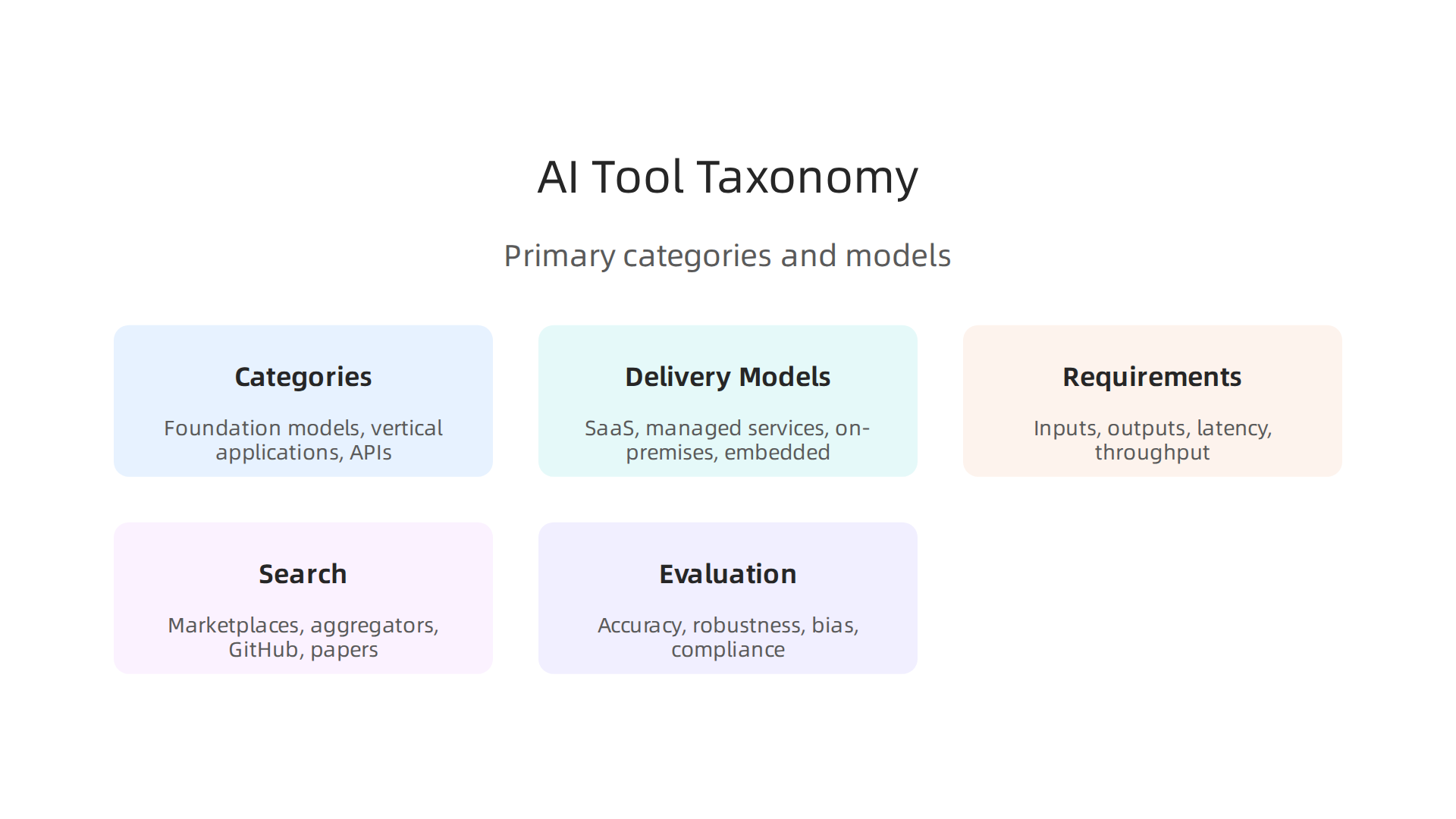
Major Categories of AI Tools
- Foundation Models: These are the big, powerful AI brains. They are trained on huge amounts of information and can do many different things, like understanding language or creating images. They are the base that many other AI tools are built upon.
- Vertical Applications (Apps): These are ready-to-use programs made for very specific jobs or industries. For example, an app might use AI to help doctors analyze patient data, or a photo AI generator for graphic designers. These apps often use foundation models behind the scenes, making them user-friendly for everyday tasks.
- Developer APIs (Application Programming Interfaces): These are like building blocks for people who write computer programs. Developers can use APIs to add AI features to their own apps without having to build the AI from scratch. It’s a way for their apps to "talk" to powerful AI models.
- MLOps Platforms: MLOps stands for Machine Learning Operations. These are tools that help manage and run AI models in a business setting. They ensure that AI systems work smoothly, get updated, and stay secure. If you’re looking for how to choose the best enterprise AI platform, MLOps is a key part of that choice.
Delivery Models: How You Get Your AI
Next, let’s talk about how these AI tools are given to you, called their "delivery model."
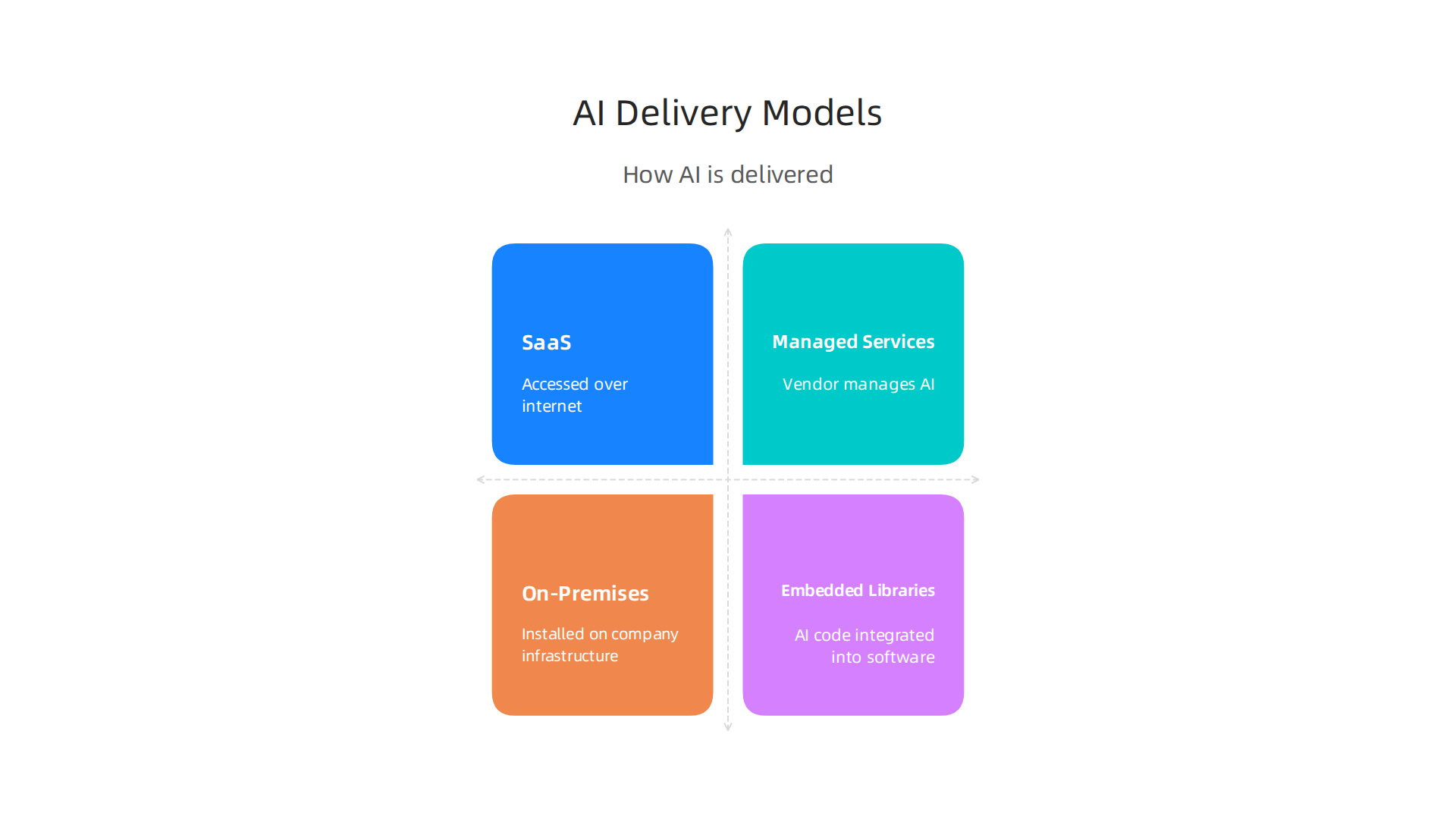
- SaaS (Software as a Service): This is the most common way. You use the AI tool over the internet, usually through a web browser. You pay a fee, often every month. You don’t have to install anything on your computer. Many social media analytics tools and other popular AI services work this way.
- Managed Services: With this model, a company takes care of the AI system for you. They handle all the technical parts, like running and updating the AI. You just use the service.
- On-Premises: This means you install and run the AI software on your own computers or servers. You have full control, which can be important for security or special needs, but you also have to manage everything yourself.
- Embedded Libraries: These are small pieces of AI code that developers add directly into other software. The AI becomes a part of that other software and runs right there.
Capability vs. Productization: What Really Matters
When you hear "there’s an AI for that," it’s good to think about two things:
- Capability: This is about what the core AI model can actually do. Can it write well? Can it find patterns in huge amounts of data analysis software? This is the raw power of the AI.
- Productization: This refers to how easy and ready the AI tool is for you to use in your daily life or work. A super powerful AI might exist, but if it doesn’t have a good, simple interface, clear instructions, or helpful customer support, it might not be very useful. Good productization means the tool is designed to fit smoothly into your tasks. In 2026, many AI automation tools are being developed with a strong focus on turning raw AI power into easy-to-use solutions.
Now that we know the different kinds of AI tools out there, the next step is to look inward. Before you start searching for "there’s an AI for that," you need to clearly define what "that" actually means for you or your business.

Jumping straight to finding a tool without understanding your problem is like buying a car without knowing where you want to go.
Build a Clear Requirements Sheet
To pick the best AI tool, you need to be very clear about what you need it to do. Think of it like making a shopping list before going to the store. Your list should include:
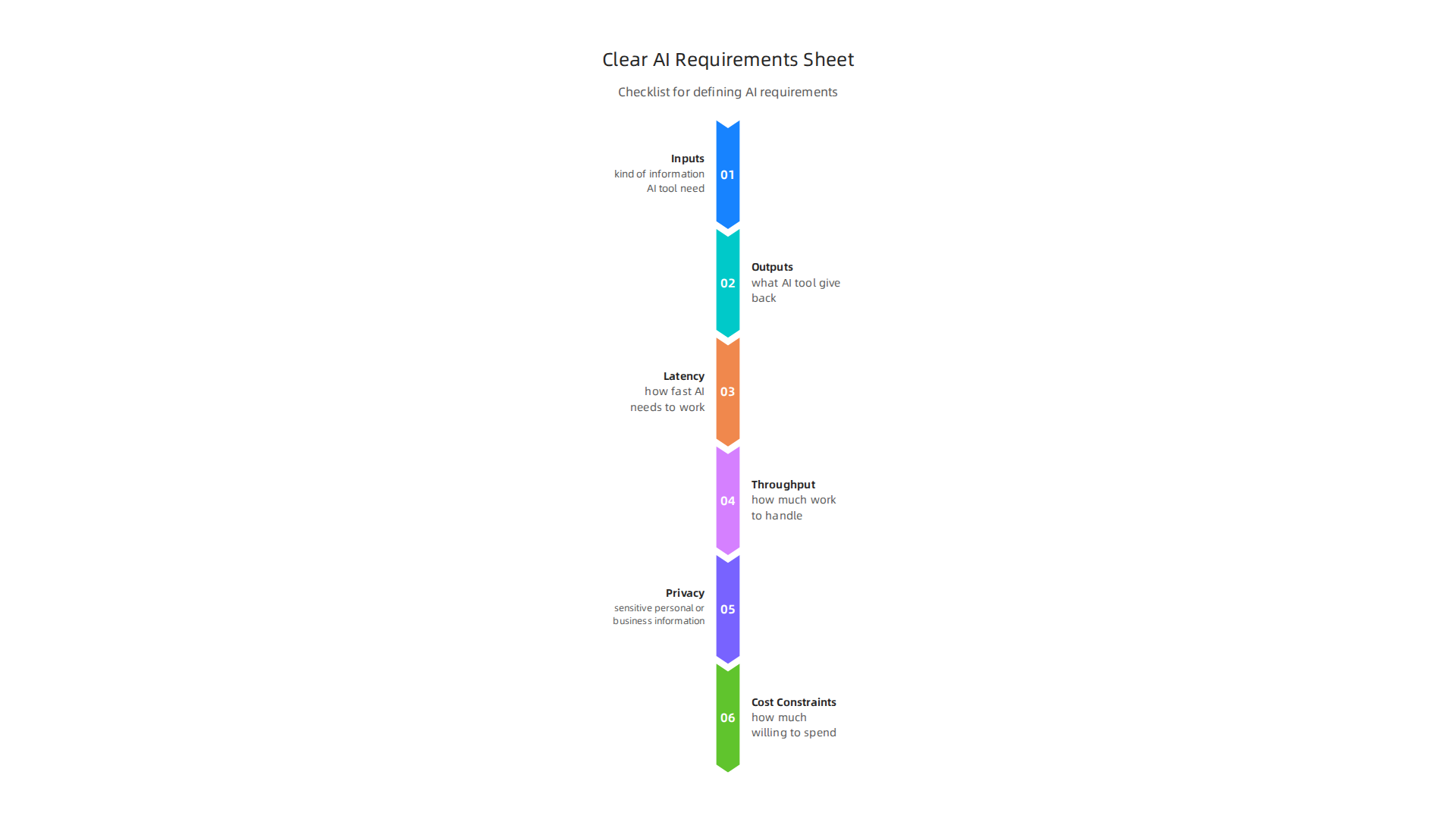
- Inputs: What kind of information will the AI tool need to work? Is it text, pictures, numbers, or sound? How much data will it use?
- Outputs: What do you expect the AI tool to give you back? Is it a summary, a prediction, a new image, or an automated task?
- Latency: How fast does the AI need to work? Does it need to respond in real-time, or can it take a few minutes or hours?
- Throughput: How much work does it need to handle at one time? Does it process one request at a time, or thousands?
- Privacy: What kind of data is involved? Is it sensitive personal or business information that needs extra protection?
- Cost Constraints: How much are you willing to spend? Remember that AI tools in 2026 often use new pricing models, like paying per use or per "token," which can make costs harder to guess than old-style subscriptions AI Pricing: What’s the True AI Cost for Businesses in 2026?. It’s not just the sticker price; you need to think about the total cost of ownership (TCO), which includes setup, upkeep, and even training people to use it What is total cost of ownership (TCO) for AI? Why it matters for your ….
Prioritize and Measure Success
Not every requirement will be equally important. You need to figure out what’s a "must-have" and what’s just a "nice-to-have."
- Must-haves are the things the AI tool absolutely needs to do for it to be useful at all.
- Nice-to-haves are features that would make the tool even better but aren’t deal-breakers if they’re missing.
Once you have your list, think about how you will know if the AI tool is actually working well. What will you measure? This could be:
- Accuracy: How correct are the AI’s answers or results?
- Latency: Is it meeting your speed requirements?
- Cost-per-use: Is it staying within your budget when you actually use it? Many AI vendors now use "hybrid pricing models" that combine subscriptions with pricing based on how much you use the AI Vendor pricing experiments leave CIOs’ AI costs in flux. So, understanding your likely usage is crucial.
Map Stakeholders and Operational Constraints
Finally, think about everyone who will be affected by or use the AI tool. These are your stakeholders. Their needs and concerns matter.
- Security: Does the AI tool meet your company’s security rules?
- Compliance: Does it follow all relevant laws and industry standards, especially for sensitive areas like data analysis or healthcare?
- Procurement: How will you buy and manage this tool? Your purchasing team will need to understand its costs and contracts. This also involves thinking about the full impact on your spending, looking at things like implementation, monthly running costs, and the total cost over a few years AI Agent Pricing 2026: Implementation Costs $2K-$65 ….
By clearly defining these points, you create a strong foundation for finding the best AI for research or any other task, avoiding wasted time and money on solutions that don’t truly fit your problem.
Want to stay on top of the latest AI news and trends to make better decisions? Get clear daily AI updates from The AI Newsletter Worth Reading.
Once you know exactly what you need an AI tool to do, the next step is finding the right one. It’s like having a clear shopping list before you go to the store. With so many AI startups and solutions launching in 2026, you might think "there’s an AI for that" for almost everything, but finding the best AI for research or other tasks needs a smart search.
Where to Look for AI Tools
Finding the right AI tool means knowing where to search. Here are the main places:
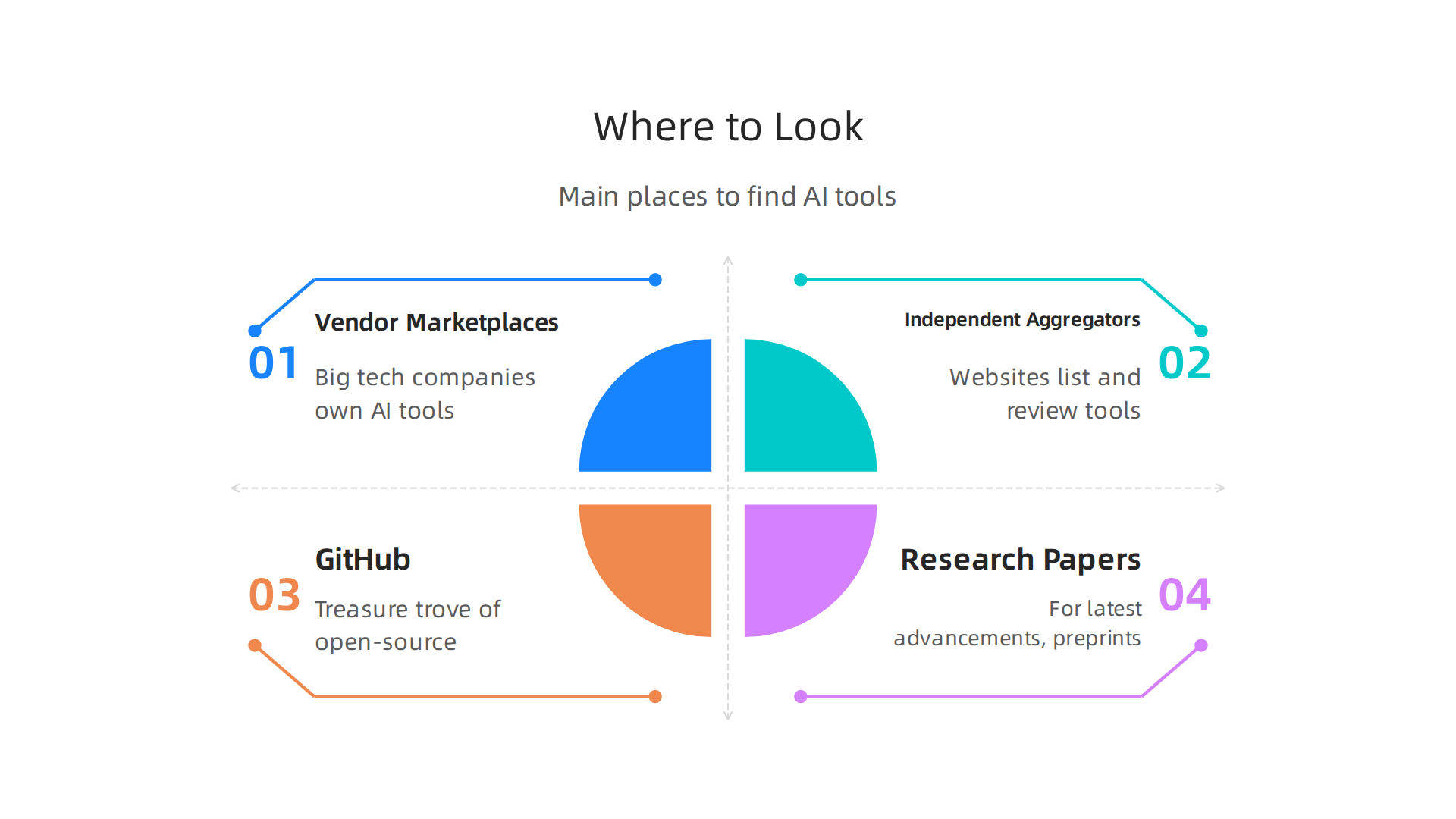
- Vendor Marketplaces: Big tech companies often have their own AI tools. Think of places like Amazon Web Services (AWS), Google Cloud, or Microsoft Azure. These marketplaces offer many AI services, especially for things like data analysis software or language tasks.
- Independent Aggregators: These are websites that list and review many different AI tools from various companies. They can be great for finding specialized tools, like those for social media analytics tools or creative tasks. These sites often help you compare options easily. You can find useful lists of tools, like the 30 Best Generative AI Tools for Enterprises in 2026.
- GitHub and Open-Source Projects: If you have technical skills, GitHub is a treasure trove. Many AI models and tools are shared openly here by developers. You can often find cutting-edge projects before they become mainstream products.
- Research Papers: For the very latest advancements, especially for academic or complex tasks, research papers are key. Websites like arXiv host "preprints," which are early versions of scientific papers. They often show new ways AI can solve problems, even if a user-friendly tool isn’t built yet. A 2026 paper, for example, shares a framework for AI Agent Systems: Architectures, Applications, and Evaluation.
Smart Search Tips and Quality Checks
Don’t just type "AI tool" into a search engine. Be smart about it!
- Advanced Query Tactics: Use specific keywords related to your needs. For instance, instead of "AI writer," try "AI content generation API with real-time editing" if that fits your requirements. You can also filter by what’s important, like if the tool offers an API for other programs to connect to, or if it has a specific license type (free, paid, open-source).
- Use Benchmarks: Think of benchmarks as report cards for AI models. They show how well an AI performs on standard tests. Looking at AI Model Benchmarks and Provider Comparison for 2026 can help you see which tools are really good at certain tasks before you even try them out.
This can save you a lot of time.
- Read Model Cards: When you find a promising AI, look for its "model card." This is like an info sheet that tells you what the AI was made for, what its limits are, and how it was trained. It helps you understand if the tool is truly a good fit for your needs and if it can handle your specific inputs and outputs safely and correctly.
By using these smart search strategies and checking how well tools perform, you can narrow down the many options and find the best AI for your unique situation, saving you time and effort.
Finding an AI tool is one thing, but making sure it actually works well for you is another. It’s like buying a new car: you don’t just pick one based on looks, you want to know if it’s safe, reliable, and does what you need. When looking at AI tools, you need to check for accuracy, how strong it is against problems, fairness, safety, and if it follows the rules.
How to Check if an AI Tool is Good
When you evaluate AI tools, you want to put them through their paces. You can do this by creating special tests.

- Make simple tests: Use a small set of your own data that the AI has never seen before. This is called a "holdout test." It helps you see how accurate the AI is with new information.
- Try to trick it: Also, run "adversarial checks." This means giving the AI tricky inputs to see if it makes mistakes or acts strangely. For example, if it’s an image AI, give it a picture with a tiny change to see if it suddenly misidentifies things.
- Measure what matters: Use special ways to measure success that fit your needs. For instance, if you’re using AI for customer service, you might measure how many problems it solves correctly without human help. Different tasks need different measures. Looking at various AI model benchmarks for 2026 can show you how models stack up on common tasks, helping you pick the best AI for research or other specific functions. Many AI models have been tested with real tasks to see how well they perform.
Checking for Fairness and Safety
It’s super important to make sure an AI tool is fair and safe. You want to avoid problems like bias, where the AI might favor one group over another.
- Spotting unfairness: Think about how the AI will be used. If it’s for hiring, you must check for bias to make sure it treats all applicants fairly. This might involve looking at its training data and how it gives answers. A responsible AI checklist can guide you in checking for bias before you use an AI tool.
- Keeping things safe: For tools that affect important things like healthcare or money, safety checks are not optional. You need to make sure the AI doesn’t give out wrong information or cause harm. For example, AI dealing with personal information needs to be tested for data privacy. There truly is an AI for that, but you need to confirm it’s a good one.
Following the Rules: Compliance
Using AI means you also have to follow certain laws and rules. This is especially true for AI startups and larger companies.
- Where data lives: Find out where the AI tool stores its data. This is called "data locality." Some countries have rules about keeping data within their borders.
- Rules and laws: Look for "regulatory flags" related to your industry and location. For example, the EU AI Act Compliance Checklist 2026 has many rules for businesses in Europe. Ignoring these can lead to big problems. Ensure your AI tools meet current legal requirements by using an AI compliance checklist for 2026.
- Contract smarts: Make sure your agreements with AI vendors have "contractual safeguards." This means clear rules about what happens if something goes wrong, how your data is protected, and who is responsible for different issues. You should also keep a record of all AI systems you use, including vendor tools and data sources.
By carefully checking these things, you can be sure the AI tool you pick is not just powerful but also accurate, fair, safe, and fully compliant with all necessary rules. Staying informed on AI advancements helps you make the best choices.
To help you stay on top of daily AI news and model launches, consider subscribing to The Deep View Newsletter. Get clear daily AI updates from The AI Newsletter Worth Reading.
Once you know an AI tool is good, the next big step is figuring out how it will fit into your daily work and how much it will truly cost. Many AI tools are available, and yes, there’s an AI for that for almost any task, but you need to think about the bigger picture.
Understanding the Real Cost of AI
The price tag on an AI tool isn’t always the full story. You need to look at the "Total Cost of Ownership," or TCO. This means all the money you spend from when you get the tool until you stop using it. It’s not just the license fee. For 2026, AI costs can be tricky because pricing models are always changing. Often, you pay per use, like per "token" for text AI, or per "API call" for other services. This can make budgets hard to plan.
Here’s what goes into the real cost:
- Per-use fees: Paying for each little task the AI does, like generating a sentence or analyzing a picture.
- Storage costs: Where the AI keeps your data.
- Monitoring: Paying to watch the AI to make sure it’s working right and not costing too much.
- Engineering work: The time and effort your team spends setting up the AI, linking it to other tools, and fixing any problems.
- Data preparation: Getting your data ready for the AI to use. This can take a lot of time.
Experts say the true cost of owning AI includes things like data preparation, integration, and even training your staff to use it effectively, not just the basic license. In 2026, many companies see their AI costs change a lot because of new pricing plans and how much they actually use the tools. You should calculate the full cost for each AI tool you are thinking about.
Making AI Work Together
Getting an AI tool to work smoothly with your existing computer systems is called "integration." Most AI tools connect using "APIs." These are like special plugs that let different computer programs talk to each other. When picking an AI, consider:
- How easy is it to connect? Does it have simple "SDKs" (software kits) to help?
- Speed: Will the AI answer quickly enough (low "latency") for your needs?
- Data storage: Where will your data live? This is "data residency," and it matters for privacy rules. For example, if you need new data analysis software for your business, consider how it will integrate.
- Watching it work: Can you see how well the AI is doing its job ("observability")? This helps you spot problems early.
It’s really important to choose the best enterprise AI platform for your organization to avoid future headaches with integration.
Avoiding Getting Stuck (Vendor Lock-in)
Sometimes, if you rely too much on one AI company, it can be hard to switch later. This is called "vendor lock-in." It means you might be stuck with their prices or rules even if you find a better option. This is a big concern for AI startups and big companies alike.
To avoid this:
- Plan ahead: Think about how you would move your data and work to a different AI tool if needed.
- Negotiate contracts: Ask for terms in your contract that make it easier to switch providers. Make sure your data can be moved easily.
- Keep your data strategy flexible: Don’t let one company control all your data. This helps keep your options open. Thinking about this flexibility might add a little cost upfront, but it can save you a lot in the long run by avoiding being stuck with one vendor.
By thinking about these costs, how to integrate, and how to stay flexible, you can make smarter choices about which AI tools are truly right for your business in 2026.
After choosing an AI tool and thinking about all the costs, the next important step is to test it. You do this with "pilot projects." These are small tests to see if the AI works well before you use it everywhere.
Designing Smart Pilot Projects
Think of a pilot project like a small science experiment. You want it to be quick and clear. In 2026, companies often design pilots to last only 8 to 12 weeks. This helps them learn fast.
Here’s how to make a good pilot project:
- Keep it small: Focus on one part of your business, one work step, or one type of data. Don’t try to test too much at once.
- Set clear goals: What do you want the AI to achieve? How will you know if it’s a success? Make sure these goals are measurable. Experts say it’s key to define success metrics before you start a pilot project AI Implementation Guide 2026: From Pilot Project to Scaled System….
- Collect data: Keep track of everything the AI does. This data will tell you if it’s working as expected.
- Have a backup plan: What if the AI doesn’t work? You need to know how to go back to your old ways without causing problems. This is called a "rollback plan."
Picking the Right Ways to Measure
When running an AI pilot, you need to watch different kinds of numbers to see how well it’s doing.
- Business numbers: How does the AI help your business? Does it save money, make customers happier, or help you make more sales? These are "business KPIs" (Key Performance Indicators). Every AI project should be linked to a business goal that can be measured How to Successfully Scale AI Adoption Beyond Initial Pilots in 2026.
- How the AI works: Is the AI fast enough? Is it correct most of the time? Does it break down often? These are "operational metrics." They tell you how reliable the AI is. For example, if you’re using AI for social media analytics tools, you’d want to track how quickly and accurately it finds important trends. Companies that reach full use of AI often define these success metrics and reorganize their work to support them AI Readiness: How Companies Move from AI Pilots in 2026 – LinkedIn.
Planning for Bigger Use (Scaling)
The real goal of a pilot is to see if the AI can be used by everyone in your company. This is called "scaling."
- Move from small to big: Think about how you will take your small test and make it a full-time tool. This means setting up systems to keep watching the AI, making sure it meets certain service levels ("SLOs"), and having enough people to manage it.
- Have a special team: Successful companies often have a team ready to handle AI operations even before they scale up. This team watches the AI in action, checks its results, and fixes any issues that come up AI Agent Scaling Gap March 2026: Pilot to Production.
- Keep learning: Just like there’s an AI for that for many tasks, there are also many ways to grow your team’s skills. Learning how to master AI in 2026 will help your company move from pilot projects to bigger AI use.
By carefully planning your pilots and how you will measure and scale them, you can make sure your AI investments truly help your business grow.
Stay on top of the latest AI trends to better inform your pilot projects and scaling strategies. Get clear daily AI updates from The AI Newsletter Worth Reading.
After figuring out if an AI tool works well in small tests, the next big step is to make sure you use AI in a smart and safe way across your whole company. This means having clear rules and knowing exactly what AI tools are in use.
Governance and an Internal AI Tool Registry: Practical Steps
Imagine your company uses many AI tools. There’s an AI for that for almost every task, from customer service to complex data analysis. But if nobody knows what tools exist, people might buy new ones that do the same thing, or use tools that aren’t approved. This is why having good rules, or "governance," and a list of all your AI tools is so important in 2026.

Why an Internal Registry Matters
A simple list, or "registry," of all your AI tools helps everyone.
- Discoverability: People can easily find existing tools. If someone needs a tool for data analysis software, they can check the registry first.
- Reuse: It stops teams from buying or building tools that already exist. This saves time and money.
- Compliance: This is a big one. Laws about AI are growing. Companies in 2026 must keep an inventory of all AI systems to follow rules. This includes tools you make and those you buy from AI startups. Many experts suggest creating an AI risk compliance checklist for 2026 laws to keep track of everything.
Minimal Governance Policies for AI Tools
You don’t need a lot of complicated rules. A few clear guidelines can make a big difference.
- Roles: Decide who is in charge of different AI tools. Who can approve new tools? Who makes sure they follow the rules?
- Approval Gates: Create simple steps for bringing new AI tools into the company. This helps make sure new tools are safe and useful.
- Documentation Standards: Decide what information you need to keep about each AI tool. This includes details like where the tool came from, what data it uses, and what it’s supposed to do. Having clear AI compliance checklist documentation helps everyone understand how the tool works. It’s also vital to assess and reduce bias before using any AI tool widely, as part of a responsible AI checklist.
Maintenance Lifecycle
AI tools need care over time, just like any other company asset.
- Deprecation: Sometimes, an AI tool gets old, or a better one comes along. You need a plan for when to stop using old tools.
- Re-evaluation Cadence: Regularly check if your AI tools are still working well and meeting your needs. Maybe the best AI for research that worked last year isn’t the best anymore.
- Vendor Performance Tracking: If you buy AI tools from other companies, keep an eye on how well those vendors support their tools. If a vendor’s information isn’t good enough, you might even need to ask for an independent audit for AI compliance.
Summary
This article explains why the phrase